
Hardware Specifications
| Vendor/Brand | FS.com |
| Model | ONU1710-1G |
| P/N | ONU1710-1G |
| SKU | 154796 |
| Chipset | Realtek RTL9601D |
| CPU | MIPS-I 32-bit (big-endian) |
| CPU Clock | 300 MHz |
| RAM | 32 MB (DDR2, 325 MHz) |
| Flash | 4 MB (SPI NOR, ZBIT JEDEC 5E4016) |
| Bootloader | U-Boot 2011.12.NA (Realtek-modified) |
| System | Linux 2.6.30.9 (Luna SDK / RSDK-1.5.6p2) |
| XPON Mode | GPON + EPON dual-mode adaptive |
| Optics | 1x PON (SC/UPC) |
| Power | 12V DC, 5.5mm barrel jack (center positive) |
| Ethernet | 1x GE (1000BASE-T, RJ45) |
| IP address | 192.168.123.1 |
| Web Gui | port 80, user admin, password super&123 |
| SSH | no |
| Telnet | port 23, user admin, password super&123 |
| Serial | 115200 8-N-1 3.3V |
| Form Factor | Desktop ONT |
Specifications
The ONU1710-1G is an XPON (GPON + EPON) dual-mode adaptive ONT with 1x GE Ethernet port. It supports 1.25 Gbps upstream and 2.5 Gbps downstream (GPON mode), complies with ITU-T G.984/G.987/G.988/G.989 standards, and supports network deployment up to 20 km.
Adapted from vendor's marketing material.
List of software versions
- 10.0.52B.2095 (2025-03-20)
Default credentials
Only the user account is publicly documented by FS.com. The admin account was discovered through firmware analysis.
| Username | Password | Access | Notes |
|---|---|---|---|
user | 123456 | Web/Telnet | Limited user account (publicly documented) |
admin | super&123 | Web/Telnet | Super user / administrator |
admin | bDcom@123 | Web | Hardcoded backdoor password; cannot be changed |
| (any) | bDcom@123 | Telnet | Hardcoded backdoor password; telnet accepts this password for any username, including nonexistent ones; cannot be changed |
Hardware
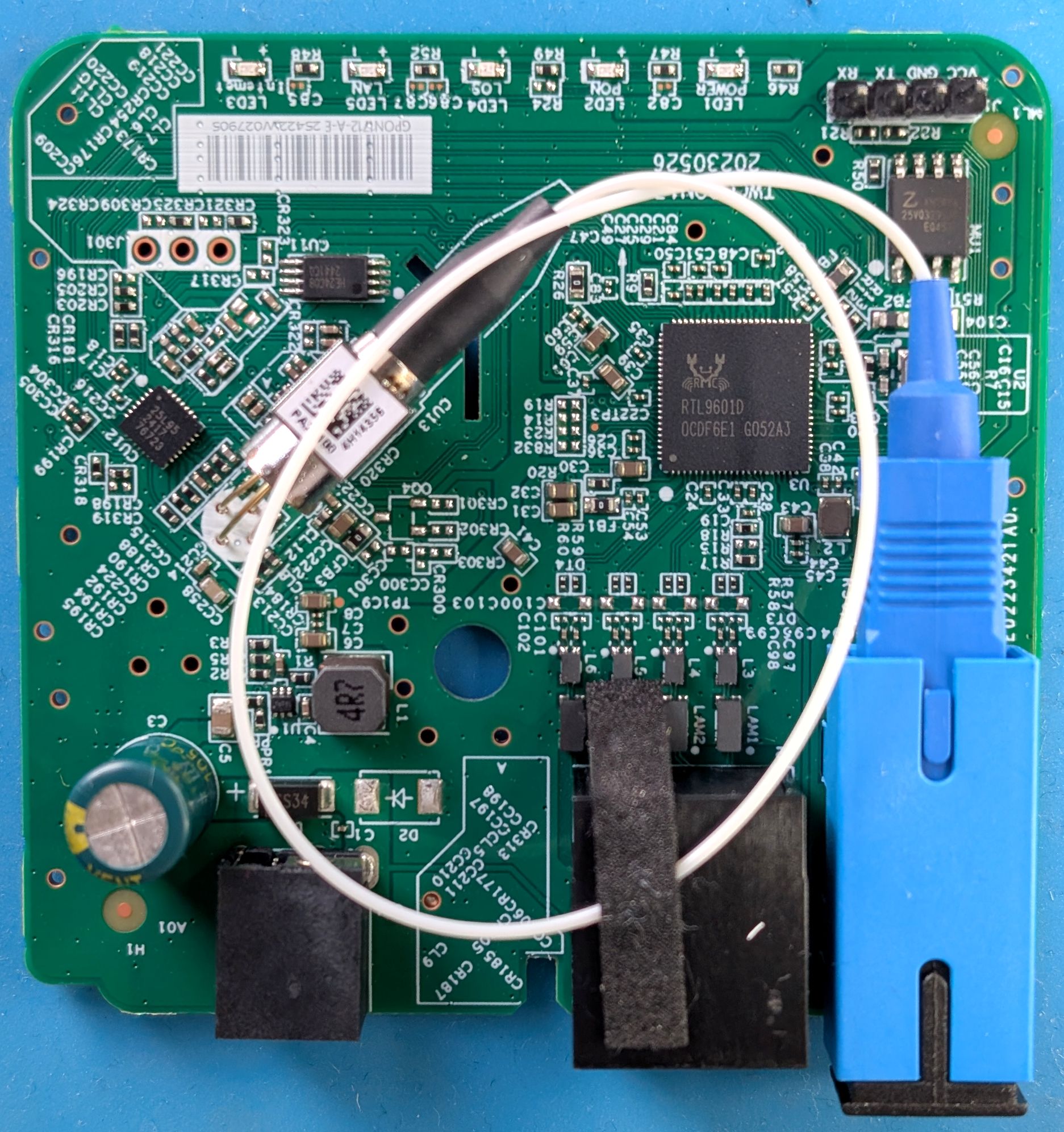
Key components:
- SoC: Realtek RTL9601D (MIPS-I 32-bit, 88-pin)
- RAM: 32 MB DDR2
- Flash: 4 MB SPI NOR (ZBIT JEDEC 5E4016)
- Optical transceiver: Semtech GN25L95 BOSA, SC/UPC connector
- Serial port: 4-pin 2.54mm header (unpopulated) 3.3V 115200 8-N-1
U-Boot environment
Full printenv output
b0=setenv bootargs ${bootargs_base} ${mtdparts0} ${rst2dfl_flg}; bootm ${img0_kernel}
b1=setenv bootargs ${bootargs_base} ${mtdparts1} ${rst2dfl_flg}; bootm ${img1_kernel}
baudrate=115200
boot_by_commit=if itest.s ${sw_commit} == 0;then run set_act0;run b0;else run set_act1;run b1;fi
boot_by_tryactive=if itest.s ${sw_tryactive} == 0;then setenv sw_tryactive 2;setenv sw_active 0;saveenv;run en_wdt;run b0;else setenv sw_tryactive 2;setenv sw_active 1;saveenv;run en_wdt;run b1;fi
bootargs_base=console=ttyS0,115200
bootcmd=if itest.s ${sw_tryactive} == 2; then run boot_by_commit;else run boot_by_tryactive;fi
bootdelay=2
en_wdt=mw b8003268 e7c00000
erase_cfgfs=sf erase ${fl_cfgfs} +${fl_cfgfs_sz}
erase_env=sf erase ${fl_env} +${fl_env_sz};sf erase ${fl_env2} +${fl_env_sz}
ethact=LUNA GMAC
ethaddr=00:E0:4C:86:70:01
fl_boot_sz=2a000
fl_cfgfs=2e000
fl_cfgfs_sz=12000
fl_env=2a000
fl_env2=2c000
fl_env_sz=2000
fl_kernel1=40000
fl_kernel1_sz=139000
fl_kernel2=40000
fl_kernel2_sz=139000
fl_rootfs1=179000
fl_rootfs1_sz=287000
fl_rootfs2=179000
fl_rootfs2_sz=287000
img0_kernel=94040000
img1_kernel=94040000
ipaddr=192.168.123.1
mtdparts0=mtdparts=rtk_spi_nor_mtd:168K(boot),8K(env),8K(env2),72K(config),1252K@256K(k0),1252K@256K(k1),2588K@1508K(r0),2588K@1508K(r1),4K@0ro,4K@0ro,4K@0ro,4K@0ro,1252K@256K(linux),2588K@1508K(rootfs) root=31:6
mtdparts1=mtdparts=rtk_spi_nor_mtd:168K(boot),8K(env),8K(env2),72K(config),1252K@256K(k0),1252K@256K(k1),2588K@1508K(r0),2588K@1508K(r1),4K@0ro,4K@0ro,4K@0ro,4K@0ro,1252K@256K(linux),2588K@1508K(rootfs) root=31:7
mupgrade_en=1
netmask=255.255.255.0
serverip=192.168.123.100
set_act0=if itest.s ${sw_active} != 0;then setenv sw_active 0;saveenv;fi
set_act1=if itest.s ${sw_active} != 1;then setenv sw_active 1;saveenv;fi
stderr=serial
stdin=serial
stdout=serial
sw_active=1
sw_commit=1
sw_tryactive=2
sw_valid0=1
sw_valid1=1
sw_version0=10.0.52B.2095
sw_version1=10.0.52B.2095
tftp_base=80000000
upb=tftp ${tftp_base} plr.img && crc32 ${fileaddr} ${filesize} && sf erase 0 +${fl_boot_sz} && sf write ${fileaddr} 0 ${filesize}
upe=tftp ${tftp_base} uboot-env-98d-eng.bin && sf erase ${fl_env} +${fl_env_sz} && sf write ${fileaddr} ${fl_env} ${fl_env_sz} && sf erase ${fl_env2} +${fl_env_sz} && sf write ${fileaddr} ${fl_env2} ${fl_env_sz}
upk=tftp ${tftp_base} uImage && crc32 ${fileaddr} ${filesize} && sf erase ${fl_kernel1} +${fl_kernel1_sz} && sf write ${fileaddr} ${fl_kernel1} ${filesize}
upk1=tftp ${tftp_base} uImage && crc32 ${fileaddr} ${filesize} && sf erase ${fl_kernel2} +${fl_kernel2_sz} && sf write ${fileaddr} ${fl_kernel2} ${filesize}
upr=tftp ${tftp_base} rootfs && crc32 ${fileaddr} ${filesize} && sf erase ${fl_rootfs1} +${fl_rootfs1_sz} && sf write ${fileaddr} ${fl_rootfs1} ${filesize}
upr1=tftp ${tftp_base} rootfs && crc32 ${fileaddr} ${filesize} && sf erase ${fl_rootfs2} +${fl_rootfs2_sz} && sf write ${fileaddr} ${fl_rootfs2} ${filesize}
upt=tftp 80000000 img.tar && upimgtar ${fileaddr} ${filesize}
upv=tftp 80000000 vm.img;upvmimg ${fileaddr}
yk=loady 80000000 && cp.b 80000000 81000000 ${filesize} && cmp.b 80000000 81000000 ${filesize} && sf erase ${fl_kernel1} +${fl_kernel1_sz} && sf write 80000000 ${fl_kernel1} ${filesize}
yr=loady 80000000 && cp.b 80000000 81000000 ${filesize} && cmp.b 80000000 81000000 ${filesize} && sf erase ${fl_rootfs1} +${fl_rootfs1_sz} && sf write 80000000 ${fl_rootfs1} ${filesize}
yu=loady 80000000 && cp.b 80000000 81000000 ${filesize} && cmp.b 80000000 81000000 ${filesize} && sf erase 0 +${fl_boot_sz} && sf write 80000000 0 ${filesize}

Environment size: 3733/8187 bytes
Key variables:
| Variable | Value (default) | Description |
|---|---|---|
sw_active | 1 | Currently active image slot (0 or 1; both point to same flash) |
sw_commit | 1 | Last committed image slot |
sw_tryactive | 2 | Boot control: 2 = boot by sw_commit; 0/1 = first-boot try |
sw_valid0/1 | 1 | Image slot validity flag |
sw_version0/1 | 10.0.52B.2095 | Firmware version string for each slot |
ethaddr | 00:E0:4C:86:70:01 | Factory MAC address |
bootdelay | 2 | U-Boot countdown in seconds before autoboot |
serverip | 192.168.123.100 | TFTP server address for firmware upload |
From the running Linux shell, U-Boot environment variables can be read and written using /bin/nv getenv <variable> and /bin/nv setenv <variable> <value>.
List of partitions
The flash uses a single-image layout — both image slots (k0/k1, r0/r1) point to the same physical offsets.
| dev | offset | size | erasesize | name | type |
|---|---|---|---|---|---|
| mtd0 | 0x000000 | 0x02A000 | 0x001000 | "boot" | Preloader + U-Boot (LZMA) |
| mtd1 | 0x02A000 | 0x002000 | 0x001000 | "env" | U-Boot environment (primary) |
| mtd2 | 0x02C000 | 0x002000 | 0x001000 | "env2" | U-Boot environment (backup) |
| mtd3 | 0x02E000 | 0x012000 | 0x001000 | "config" | JFFS2 configuration filesystem |
| mtd4 | 0x040000 | 0x139000 | 0x001000 | "k0" | Kernel uImage (LZMA) |
| mtd5 | 0x179000 | 0x287000 | 0x001000 | "r0" | Root filesystem (SquashFS+LZMA) |
| mtd6 | 0x040000 | 0x139000 | 0x001000 | "k1" | Kernel uImage (same as k0) |
| mtd7 | 0x179000 | 0x287000 | 0x001000 | "r1" | Root filesystem (same as r0) |
To dump the full flash contents over serial from the U-Boot prompt, read it in 1 MB chunks using sf read and dump each chunk as hex with md.b:
sf probe
sf read 0x80000000 0x000000 0x100000
md.b 0x80000000 0x100000
sf read 0x80000000 0x100000 0x100000
md.b 0x80000000 0x100000
sf read 0x80000000 0x200000 0x100000
md.b 0x80000000 0x100000
sf read 0x80000000 0x300000 0x100000
md.b 0x80000000 0x100000
Capture the serial output with a terminal emulator, then convert the hex dump to binary.
Bootup
Full boot log captured on serial port
9601D
PRELOADER Bismarck 3.5
II: PLR:c988baff, Build_date:24082711, Toolkit:rsdk-1.5.6-5281-EB-2.6.30-0.9.30.3-131105
II: Disable OCP Timeout Monitor
II: Disable LX Timeout Monitor
II: Enable Triple Synchronizer
II:cg_cpu_clk_init doneII:cg_spif_clk_init doneII: CPU 300MHz (600/2/0), MEM 325MHz, LX 200MHz, SPIF 25MHz
II: NOR SPI-F... 5E4016/MMIO16-1/ModeC done
AK: DRAM AUTO CALIBRATION(20210202)
AK: ZQ Calibration PassedAK: ZQ Calibration PassedAK: ZQ Calibration PassedAK: ZQ Calibration PassedAK: MR0: 0x00100952
AK: MR1: 0x00110040
AK: MR2: 0x00120000
AK: MR3: 0x00130000
AK: clear dwdqor
AK: Bit/max_r_s/max_r_l/max_w_s/max_w_l Bit/max_r_s/max_r_l/max_w_s/max_w_l(Hex)
[ 0] 0 1f 0 17 [16] 0 1f 0 17
[ 1] 0 1f 0 19 [17] 0 1f 0 17
[ 2] 0 1f 0 17 [18] 0 1f 0 17
[ 3] 0 1f 0 17 [19] 0 1f 0 15
[ 4] 0 1f 0 19 [20] 0 1f 0 17
[ 5] 0 1f 0 17 [21] 0 1f 0 17
[ 6] 0 1f 0 19 [22] 0 1f 0 17
[ 7] 0 1f 0 17 [23] 0 1f 0 17
[ 8] 0 1f 0 19 [24] 0 1f 0 19
[ 9] 0 1f 0 19 [25] 0 1f 0 19
[10] 0 1f 0 17 [26] 0 1f 0 17
[11] 0 1f 0 19 [27] 0 1f 0 19
[12] 0 1f 0 19 [28] 0 1f 0 19
[13] 0 1f 0 17 [29] 0 1f 0 17
[14] 0 1f 0 19 [30] 0 1f 0 19
[15] 0 1f 0 17 [31] 0 1f 0 17
AK: DQ enable delay sync with DQ delay tap.
0xb80015D0=0x07070807, 0xb80015D4=0x07080708, 0xb80015D8=0x08070808, 0xb80015DC=0x07080708
AK: DRAM size = 0x2000000
AK: Disable read after write function
AK: Support tREFI divided by 4
AK: dram auto calibrtaion is done
II: MEM_PROBE_OK
II: MEM_XLAT_OK
II: MEM_TO_REG_OK
II: MEM_CAL_OK
II: Change Stack from 0x9f007ff8 to 0x80efffe0
II: Decompressing U-Boot (0x81c00000 <- 0x9fc179c0)... (187 KB <- 71 KB) OK
II: Starting U-boot...
U-Boot 2011.12.NA (Aug 27 2024 - 11:38:05)
Board: RTL9601D, CPU:300MHz, LX:200MHx, MEM:325MHz, Type:DDR2
DRAM: 32 MB
SPI-F: ZBIT/5E4016/MMIO16-1/ModeC 1x4 MB (plr_flash_info @ 81c2d30c)
Loading 8192B env. variables from offset 0x2a000
Loading 8192B env. variables from offset 0x2c000
Loaded 8192B env. variables from offset 0x2c000
Net: LUNA GMAC
Warning: eth device name has a space!
Hit any key to stop autoboot: 2 1 0
swcore_init
multicast_start Using LUNA GMAC device
mcast upgrade timeout.
## Booting kernel from Legacy Image at 94040000 ...
Image Name: Linux Kernel Image
Created: 2025-03-20 9:02:52 UTC
Image Type: MIPS Linux Kernel Image (lzma compressed)
Data Size: 932625 Bytes = 910.8 KB
Load Address: 80000000
Entry Point: 80000000
Verifying Checksum ... OK
Uncompressing Kernel Image ... OK
Starting kernel ...
=================================
rtk_ldo_init
=================================
0xbb000044=0x00000002
0xbb000130=0x00ec0005
=================================
rtk_ims_init
=================================
init started: BusyBox v1.12.4 (2025-03-20 16:59:46 CST)
starting pid 149, tty '': '/etc/init.d/rcS'
=== Start to run rc0 / rc63 ===
----- do_rc [/etc/init.d/rc2] -----
Mounting /dev/mtdblock3 onto /var/config as the configuration data storage
----- do_rc [/etc/init.d/rc3] -----
no need to do reset to default
------ [-b]Bootup_config ------
Wait for configd initialize 'MsgQ' and 'Shm'...
set_msgqueue_max_size:180> set msgqidds.msg_qbytes=20600 OK
set_msgqueue_max_size:180> set msgqidds.msg_qbytes=20600 OK
Fetch mib data (type 8) from program code.
Fetch mib data (type 2) from program code.
Pre-fetch mib data from program default done.
Checking input file [/var/config/lastgood_hs.xml].
[OK] Valid config file!
***** config_parser(): dfname=[/etc/config_default_hs.xml](0) loaded *****
***** config_parser(): fname=[/var/config/lastgood_hs.xml](0) loaded *****
[xml_INFO]: Load HS configuration success.
Checking input file [/var/config/lastgood.xml].
[OK] Valid config file!
***** config_parser(): dfname=[/etc/config_default.xml](0) loaded *****
***** config_parser(): fname=[/var/config/lastgood.xml](0) loaded *****
[xml_INFO]: Load CS configuration success.
running GPON mode ...
==== check omci mib
----- do_rc [/etc/init.d/rc10] -----
----- do_rc [/etc/init.d/rc14] -----
/etc/init.d/rc14: line 8: can't create /proc/sys/net/ipv6/conf/all/mc_forwarding: nonexistent directory
----- do_rc [/etc/init.d/rc32] -----
MIB chain descriptors checking (total 10) ok !
rtkbosa: Donât care pon mode, use general file
md5sum: can't open '/var/config/rtkbosa_k.bin': No such file or directory
igmpd is running: sys_max_port_num =4 .....
cat: can't open '/var/config/rtkbosa_k_checksum': No such file or directory
rtkbosa: checksumold =
rtkbosa: Use general file [/var/config/rtkbosa_k.bin]
rtkbosa: Version 2.9 (Mar 20 2025 - 17:02:01)
rtkbosa: Detecting RTL8290B ...
rtkbosa: Error (0x10): The chip is not found
rtkbosa: Detecting UX3360 ...
rtkbosa: Read 0x51.0x80(0x55): 0xFF
rtkbosa: Read 0x51.0x81(0x58): 0xFF
rtkbosa: Read 0x51.0x82(0x33): 0xFF
rtkbosa: Read 0x51.0x83(0x33): 0xFF
rtkbosa: Read 0x51.0x84(0x36): 0xFF
rtkbosa: Read 0x51.0x85(0x30): 0xFF
rtkbosa: Detecting Semtech Series (GN2xL9x) ...
rtkbosa: Read 0x51.0x7B(0x00): 0x00
rtkbosa: Read 0x51.0x7C(0x00): 0x00
rtkbosa: Read 0x51.0x7D(0x00): 0x00
rtkbosa: Read 0x51.0x7E(0x00): 0x00
rtkbosa: Detecting Semtech Bosa ID ...
rtkbosa: A2 Table ff: 0x80 = 0xff ; 0x85 = 0xff ; 0x86 = 0xff
rtkbosa: A2 Table 2: 0xD1 = 0xa3
rtkbosa: SEMTECH GN25L95 is Found
rtkbosa: A2 Table 0x02.0xc0 = 0x1f
rtkbosa: EEPROM exists, bosa should be working.
----- do_rc [/etc/init.d/rc34] -----
----- do_rc [/etc/init.d/rc35] -----
Turn on phy power...
not support poe
<fMgmtInit:601>the . is not a regular file.
<fMgmtInit:601>the .. is not a regular file.
<fMgmtInit:601>the internal is not a regular file.
Module libigmpipc.so is loaded and inited
stat failed: /lib/features/internal/bdp_00000002.so
no hook voice service
omci_wrapper_msgHandler: devMode 0,receiveState 1,usrLogLvl 1, drvLogLvl 1,sn FSCM¦¼ì
MIB_Table_Init Init mib table:mib_Me242.so fail, error code is:1...
MIB_Table_Init Init mib table:mib_Me243.so fail, error code is:1...
MIB_Table_Init Init mib table:mib_Me350.so fail, error code is:1...
MIB_Table_Init Init mib table:mib_Me370.so fail, error code is:1...
MIB_Table_Init Init mib table:mib_Me373.so fail, error code is:1...
omci_wrapper_activateGpon ioctl failed
GPON SN is FSCM99a6bcec
listening
system(): /bin/echo 1 eth0.2 > /proc/rtl8686gmac/dev_port_mapping
port set phy-force-power-down port all state disable
RTK.0> command:
Please press Enter to activate this console. starting pid 547, tty '': '/bin/inetd'
rtk_pon_led_SpecType_set 0
ip6tables v1.2.7a: can't initialize ip6tables table `filter': iptables who? (do you need to insmod?)
Perhaps iptables or your kernel needs to be upgraded.
ip6tables v1.2.7a: can't initialize ip6tables table `filter': iptables who? (do you need to insmod?)
Perhaps iptables or your kernel needs to be upgraded.
ip6tables v1.2.7a: can't initialize ip6tables table `filter': iptables who? (do you need to insmod?)
Perhaps iptables or your kernel needs to be upgraded.
ip6tables v1.2.7a: can't initialize ip6tables table `filter': iptables who? (do you need to insmod?)
Perhaps iptables or your kernel needs to be upgraded.
ip6tables v1.2.7a: can't initialize ip6tables table `filter': iptables who? (do you need to insmod?)
Perhaps iptables or your kernel needs to be upgraded.
ip6tables v1.2.7a: can't initialize ip6tables table `filter': iptables who? (do you need to insmod?)
Perhaps iptables or your kernel needs to be upgraded.
ip6tables v1.2.7a: can't initialize ip6tables table `filter': iptables who? (do you need to insmod?)
Perhaps iptables or your kernel needs to be upgraded.
ip6tables v1.2.7a: can't initialize ip6tables table `filter': iptables who? (do you need to insmod?)
Perhaps iptables or your kernel needs to be upgraded.
ip6tables v1.2.7a: can't initialize ip6tables table `filter': iptables who? (do you need to insmod?)
Perhaps iptables or your kernel needs to be upgraded.
ip6tables v1.2.7a: can't initialize ip6tables table `filter': iptables who? (do you need to insmod?)
Perhaps iptables or your kernel needs to be upgraded.
ip6tables v1.2.7a: can't initialize ip6tables table `filter': iptables who? (do you need to insmod?)
Perhaps iptables or your kernel needs to be upgraded.
Restart IPv6 Filter!
ip6tables v1.2.7a: can't initialize ip6tables table `filter': iptables who? (do you need to insmod?)
Perhaps iptables or your kernel needs to be upgraded.
ip6tables v1.2.7a: can't initialize ip6tables table `filter': iptables who? (do you need to insmod?)
Perhaps iptables or your kernel needs to be upgraded.
Update Firewall rule set by user.
Open file /var/prefix_info fail !
Error! Note Got prefix yet!
ip6tables v1.2.7a: can't initialize ip6tables table `filter': iptables who? (do you need to insmod?)
Perhaps iptables or your kernel needs to be upgraded.
port set phy-force-power-down port all state enable
RTK.0> command:port set phy-force-power-down port all state disable
RTK.0> command:iptables v1.2.7a: Couldn't find target `lan_mark'
Try `iptables -h' or 'iptables --help' for more information.
Illegal target name 'portmapping'.
RTNETLINK answers: No such file or directory
RTNETLINK answers: No such file or directory
RTNETLINK answers: No such file or directory
RTNETLINK answers: No such file or directory
RTNETLINK answers: No such file or directory
RTNETLINK answers: No such file or directory
RTNETLINK answers: No such file or directory
RTNETLINK answers: No such file or directory
RTNETLINK answers: No such file or directory
RTNETLINK answers: No such file or directory
RTNETLINK answers: No such file or directory
RTNETLINK answers: No such file or directory
RTNETLINK answers: No such file or directory
RTNETLINK answers: No such file or directory
RTNETLINK answers: No such file or directory
RTNETLINK answers: No such file or directory
RTNETLINK answers: No such file or directory
RTNETLINK answers: No such file or directory
RTNETLINK answers: No such file or directory
RTNETLINK answers: No such file or directory
RTNETLINK answers: No such file or directory
size of linux : 1282048
size of linux : 3932160
init_global_parm846::size of g_max_upload_size : 3932160
RTNETLINK answers: No such file or directory
RTNETLINK answers: No such file or directory
RTNETLINK answers: No such file or directory
RTNETLINK answers: No such file or directory
RTNETLINK answers: No such file or directory
RTNETLINK answers: No such file or directory
RTNETLINK answers: No such file or directory
Init System OK for IPV6
starting pid 546, tty '/dev/ttyS0': '-/bin/sh'
BusyBox v1.12.4 (2025-03-20 16:59:46 CST) built-in shell (ash)
Enter 'help' for a list of built-in commands.
Please enter the username and password.
Username:admin
Password:********* (super&123)
# cat /proc/version
Linux version 2.6.30.9 (root@svn-onu) (gcc version 4.4.6 (Realtek RSDK-1.5.6p2) ) #1 Thu Mar 20 17:00:24 CST 2025 10.0.52B.2095_FS
# cat /proc/self/status | grep ^Uid
Uid: 0 0 0 0
#- Preloader (Bismarck 3.5) initializes DDR2 DRAM, decompresses and launches U-Boot
- U-Boot (2s delay, 115200 baud) checks
sw_tryactive: if it equals2, boots bysw_commit; otherwise it is a first-boot attempt that setssw_tryactive=2, saves env, and boots the selected image - Kernel boots with
console=ttyS0,115200, mounts SquashFS root /etc/init.d/rcSruns init scriptsrc0–rc63sequentially:rc2: Mounts/proc, ramfs, sysfs, tmpfs/dev; mounts JFFS2 config to/var/config; brings uploandnas0rc3: Runsconfigd, loads XML config (config_xmlconfig.sh -b), inserts kernel modules (insdrv.sh), runs SDK init (runsdk.sh), starts OMCI (checkomci)rc10: Tunes kernel network parameters (conntrack timeouts, IP forwarding)rc14: Configures IPv6 sysctl settingsrc32: Launchesstartupdaemon and BOSA optical calibration (rtkbosa.sh)rc34: Enables hardware watchdogrc35: Enables PHY ports
Filesystem
The root filesystem is a SquashFS image (LZMA-compressed) with 525 files and stripped binaries. Runtime state is kept on a tmpfs (/var) and the JFFS2 config partition (mounted at /var/config).
squashfs-root/
  bin/         -- BusyBox 1.12.4 + OMCI tools (omcicli, omci_app, checkomci), boa, iptables,
               -- diag, ethctl, flash (aliased as nv), configd, xmlconfig, pondetect, igmpd, ...
  etc/
    init.d/    -- rcS, rc2, rc3, rc10, rc14, rc32, rc34, rc35
    scripts/   -- mnt_cfgfs.sh, insdrv.sh, runsdk.sh, rtkbosa.sh, factory reset helpers
  home/httpd/
    boa.conf   -- Boa v0.94 web server configuration (User 0, Group 0)
    web/       -- 243 ASP pages (WAN, LAN, OMCI info, VLAN, QoS, firewall, TR-069, diagnostics, ...)
  lib/
    librtk.so        -- Realtek SDK (~964 KB, largest userspace library)
    libmib.so        -- MIB management
    libomci_*.so     -- OMCI stack (API, FAL, GOS, MIB, voice)
    libmultilang_*.so -- i18n strings (Chinese + English)
    modules/         -- Kernel modules (omcidrv.ko, pf_rtk.ko, epon_drv.ko, igmp_drv.ko,
                     --   europa_drv.ko, rldp_drv.ko, dpbcaster.ko, ...)
    omci/            -- 127 OMCI MIB handler plugins (.so), one per managed entity type
    voip/            -- SIP/VoIP libraries
  etc/scripts/flash  -- Shell script for reading/writing MIB variables via xmlconfig
The config partition (/var/config) holds lastgood.xml (XML runtime config, persisted across reboots) and OMCI MIB state (omci_mib.cfg).
Note: the flash MIB tool (/etc/scripts/flash) and the nv U-Boot env tool (/bin/nv) are separate commands for different purposes.
GPON/OMCI settings
Via web UI
The ONU1710-1G exposes several hidden web UI pages for GPON/OMCI configuration that are not linked in the main navigation. Log in as admin and access them by URL.
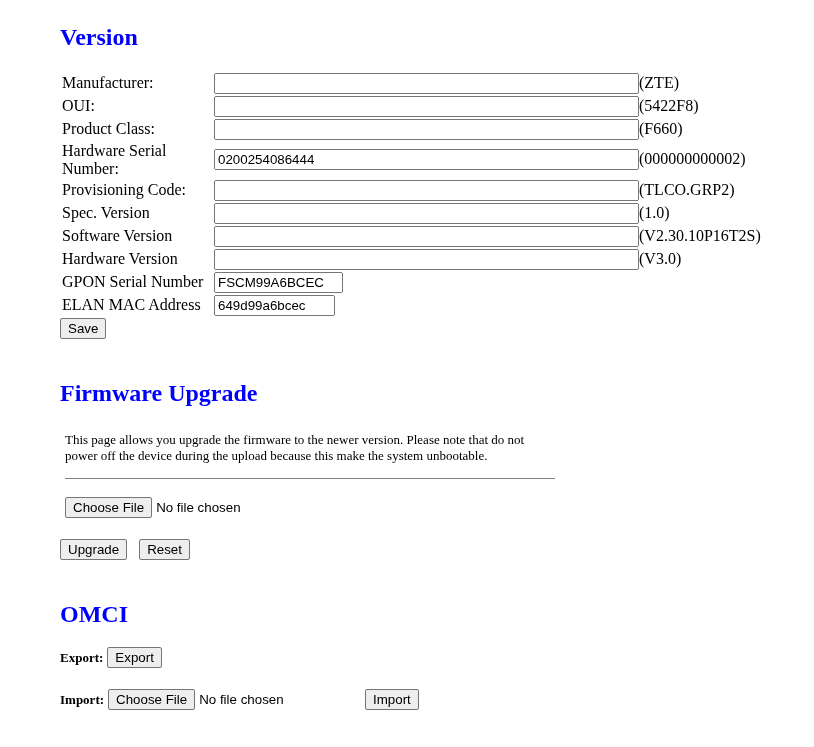
Version modification (vermod.asp)
Accessible at http://192.168.123.1/vermod.asp, this page allows changing:
- Manufacturer, OUI, Product Class
- Serial Number, Provisioning Code
- Spec Version, Software Version, Hardware Version
- GPON Serial Number
- ELAN MAC Address
- Export: Download the current OMCI event log
- Import: Upload a shell script that is executed as root (see Security section)
GPON configuration (gpon.asp)
Accessible at http://192.168.123.1/gpon.asp, this page allows changing:
- PLOAM Password (max 10 characters)
- LOID (max 24 characters)
- LOID Password (max 12 characters)
OMCI information (omci_info.asp)
Accessible at http://192.168.123.1/omci_info.asp, this page allows viewing/changing:
- OMCI Software Version 1/2
- CWMP Product Class
- CWMP Hardware Version
- OMCI Vendor ID
WAN configuration (waneth.asp)
Accessible at http://192.168.123.1/waneth.asp, this page supports the following connection types:
- Bridge: Transparent L2 bridge (no NAT, no routing)
- PPPoE: PPP over Ethernet (typical ISP authentication)
- IPoE: IP over Ethernet (DHCP or static IP)
The page also allows configuring NAPT (NAT), IGMP snooping, QoS, default route, and IPv6.
Via Telnet
Configuration can be done via telnet using the flash command (/etc/scripts/flash). The user and admin passwords can also be changed through the web UI.
# LOID and PLOAM password
flash get LOID
flash set LOID YOURLOID
flash get LOID_PASSWD
flash set LOID_PASSWD YOURLOIDPASSWORD
flash get GPON_ONU_PASSWD
flash set GPON_ONU_PASSWD 1234567890

# GPON serial number / vendor ID
flash get GPON_SN
flash set GPON_SN ABCD12345678
flash get PON_VENDOR_ID
flash set PON_VENDOR_ID ABCD

# Hardware / software version strings (reported via OMCI)
flash get HW_HWVER
flash set HW_HWVER 1.0
flash get HW_CWMP_PRODUCTCLASS
flash set HW_CWMP_PRODUCTCLASS MyProduct

# OMCI software version
flash get OMCI_SW_VER1
flash set OMCI_SW_VER1 V1.9.0
flash get OMCI_SW_VER2
flash set OMCI_SW_VER2 V1.9.0

# PON mode (1=GPON, 2=EPON, 3=Ethernet)
flash get PON_MODE
flash set PON_MODE 1

# Bridge mode
flash get DIRECT_BRIDGE_MODE
flash set DIRECT_BRIDGE_MODE 1

# User and admin passwords
flash get USER_PASSWORD
flash set USER_PASSWORD newpassword
flash get SUSER_PASSWORD
flash set SUSER_PASSWORD newpassword
Security considerations
Warning
This device has extremely poor security practices and should not be used in any environment where it may be reachable by untrusted parties.
- Undocumented default credentials: The
adminaccount (super&123) is not mentioned in any FS.com documentation but has full administrative access. The firmware also contains references to additional accounts (adsl/xponadmin,xponadmin/xponre@1t3k) in inactive backup config files and hardcoded code paths. These were not usable but are likely leftovers from the Realtek SDK. - Hardcoded backdoor password: The password
bDcom@123is hardcoded in the firmware and cannot be changed. It grants access asadminto the web interface. On telnet it is accepted for any supplied username, including nonexistent ones, and results in arootshell. - Unencrypted management protocols: Both the web interface (HTTP port 80) and Telnet (port 23) transmit credentials and configuration in cleartext. Both are enabled by default.
- Arbitrary script upload and execution: The
vermod.asppage has an "Import" form that posts to/boaform/formImportOMCIShell. The handler writes the uploaded file to/tmp/omcishelland executes it immediately viasystem("/bin/sh /tmp/omcishell"). Likely an intentional debug feature that allows theadminuser to execute commands as root without going through telnet. - Privilege escalation via auth realm mismatch: The Boa web server maps
/to admin credentials and/boaform/adminto user credentials. Admin-only handlers likeformImportOMCIShellcan be reached by the low-privilegeuseraccount by requesting/boaform/admin/formImportOMCIShellinstead. This gives the unprivileged account full root access. - All services run as root: The web server (Boa), telnet daemon, and OMCI stack all run with root privileges (UID 0).
- Management services bind on all interfaces: Boa (port 80) and telnet (port 23) bind to
::with no iptables rules. When connected to GPON, depending on the ISP's network configuration, these services may be reachable beyond the LAN; though this has not been practically verified.