Nokia XS-010X-R
Hardware Specifications
| Vendor | Nokia |
| Model | XS-010X-R |
| ODM | unknow (CIG?) |
| ODM Product Code | XG-99YF |
| Chipset | Cortina CA8271NI |
| Manufacter | unknow (CIG?) |
| Flash | 128MB (MX35LF1GE4AB, but there are also Models with 25NO1GVZEIR) |
| RAM | 256MB |
| System | Custom Cortina Linux (Saturn SDK) based on Kernel 4.14(.172.saturn2-sfu-r2.2.1.3) |
| 10GBaseT | Yes |
| Optics | SC/APC |
| IP address | 192.168.100.1 |
| Web Gui | ✅ Port 80 user: admin, password: 1234 |
| SSH | ✅ (but filtered) |
| Telnet | ✅ Port 23 user: admin, password: 1234 |
| Serial | ✅ |
| Serial baud | 115200 |
| Serial encoding | 8-N-1 |
| Form Factor | ONT |
External/Internal Photo
The physical construction is very similar to XS-010X-Q.
However it seems the fiber is much shorter and on some models there is no heat-spreader foil covering the SOC (CA8271NI).
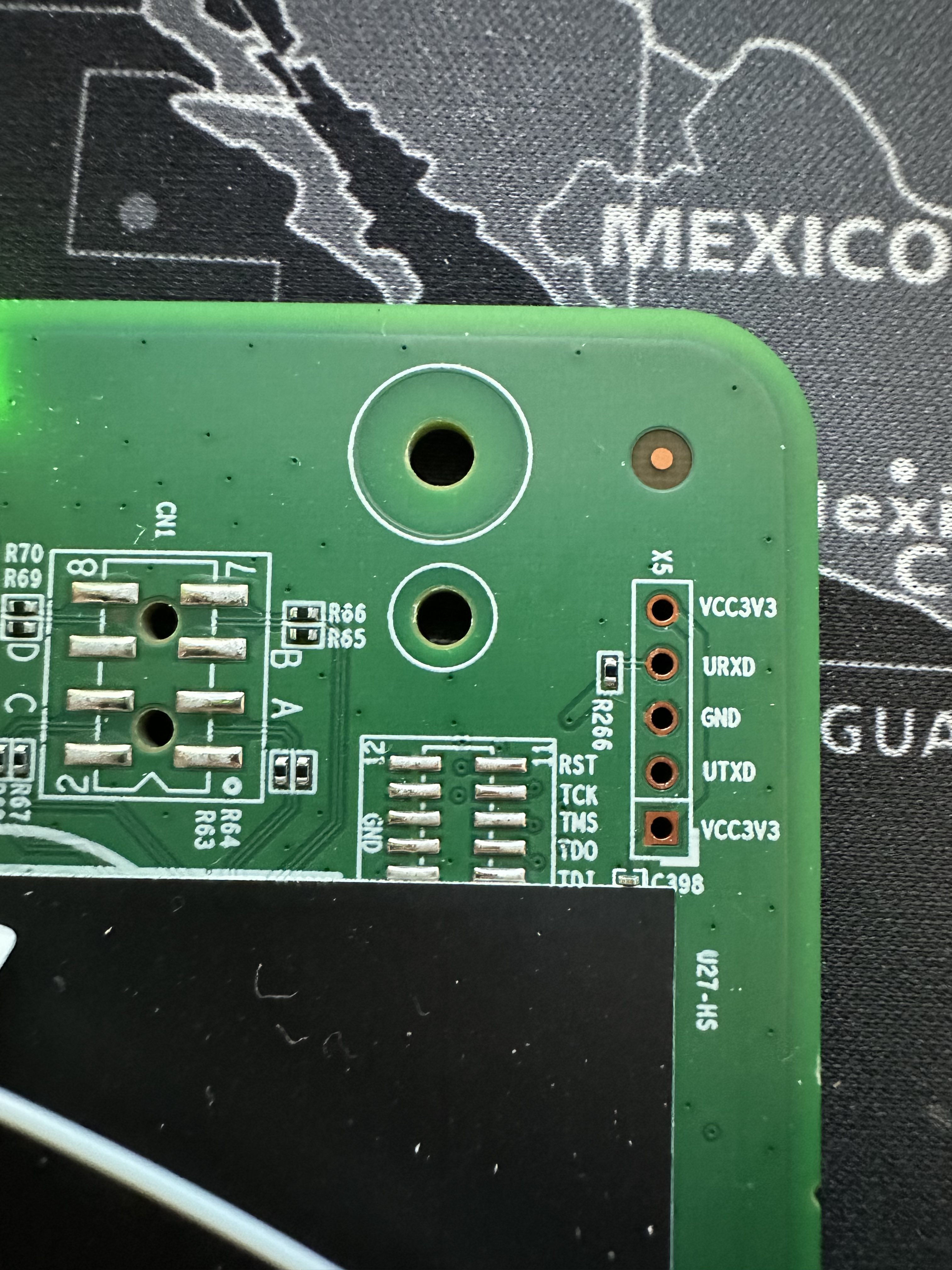
On the “-R”, the UART port is filled with solder and must be cleaned first, before pinheaders for UART can be mounted.
Serial
The ONT has a TTL 3.3v UART console (configured as 115200 8-N-1) that can be accessed from the top surface: it’s on the top left of the board, when the Ethernet\Power\Optical ports are facing down. TX, RX and ground pads need to be connected to a USB2TTL adapter supporting 3V3 logic. (So far this is similar to XS-010X-Q)
However after u-boot booting the kernel, there is no further interaction possible.
Since devicetree and cmdline seem okay (and unchanged compared to XS-010X-Q), most likely the UART is disabled within the kernel binary…
List of software versions
- 3TN00669AOCK15 (deutsche Glasfaser)
- 3NT00669AOCK50
List of partitions
All data is retrieved by flash dumps. The system uses the NAND-chips hardware ECC and makes no individual use of 64byte OOB per page.
All offsets are related to logical blocks (without ECC OOB): 128KiB block with 64pages each 2KiB.
| dev | offset | size | erasesize | name |
|---|---|---|---|---|
| mtd0 | 0x0000000 | 4 MiB | 00020000 | “ssb” |
| mtd1 | 0x0400000 | 1 MiB | 00020000 | “uboot-env0” |
| mtd2 | 0x0500000 | 1 MiB | 00020000 | “uboot-env1” |
| mtd3 | 0x0600000 | 1 MiB | 00020000 | “dtb0” |
| mtd4 | 0x0700000 | 6 MiB | 00020000 | “kernel0” |
| mtd5 | 0x0D00000 | 40 MiB | 00020000 | “rootfs0” (ubi) |
| mtd6 | 0x3500000 | 1 MiB | 00020000 | “dtb1” |
| mtd7 | 0x3600000 | 6 MiB | 00020000 | “kernel1” |
| mtd8 | 0x3C00000 | 40 MiB | 00020000 | “rootfs1” (ubi) |
| mtd9 | 0x6400000 | 20 MiB | 00020000 | “userdata”(ubi) |
| ???? | 0x7800000 | 1 MiB | 00020000 | “mfginfo0” |
| ???? | 0x7900000 | 1 MiB | 00020000 | “mfginfo1” |
This ONT supports dual boot.
kernel0 and rootfs0 respectively contain the kernel and firmware of the first image, kernel1 and rootfs1 the kernel and firmware of the second one.
mfginfo0 and mfginfo1 (in the first 256bytes) contain the MAC-addresses and the serial (at offset 0x68). The last 4 byte seem to be a UNKNOWN checksum.
The third 256 byte block (offsets 0x7800200 and 0x7900200) contains the user configurable PON-ID. Here the 4byte checksum at the end is CRC-32/BZIP2 in BIG-endian (Polynom: 0x04C11DB7).
I really would be interested what the checksum is / how the checksum of the first block is calculated.
Even the relevant kernel modules “ca_ne.ko” (authored by Aaron ans Raymond Tseng) claims to be GPL - the cortina team didn’t respond to my mails asking for source code / details.
Usage
Login and enable
Once you’re logged in, a custom menu will be shown and you’ll be able to access the linux shell by first typing system followed by shell:
ONT>enable
#ONT>login
User name:ONTUSER
Password: ****
The enable password can be generated using the following form:
Access Full Shell
To access a complete linux shell just type:
#ONT>system
#ONT/system>shell
To exit the shell and reach the parent menu type exit or x, in each menu the help command will show how to use the shell
GPON ONU status
Getting the operational status of the ONU
#ONT>traffic
#ONT/system>pon
#ONT/system/pon>show link

 ----------------- LINK STATE -----------------
 Link State:              ACTIVE
 Operation State Machine: OPERATION (O5)
 ----------------- STATE  END -----------------
Querying a particular OMCI ME
#ONT>system
#ONT/system>mib
#ONT/system/mib>show 256
Table Ontg, Ont-g, total 1 instances

EntityID                  = 0x0000
VID                       = "ALCL"
Version                   = AA BB CC DD EE FF 11 22 33 44 55 66 00 00
SerialNum                 = AA BB CC DD EE FF 11 22
TraffMgtOpt               = 0
AtmCCOpt                  = 0
BatteryBack               = 1
AdminState                = 0
OpState                   = 0
OnuSurvivalTime           = 0
Loid                      = ""
Password                  = ""
AuthState                 = 0
OntState                  = 1
GPON/OMCI settings
Committing changes to the OMCI MIB tables for GPON operation
#ONT>system
#ONT/system>mib
#ONT/system/mib>reset
Getting/Setting ONU GPON Serial Number
#ONT>system
#ONT/system>misc
#ONT/system/misc>eqsn set "ALCL00000001"
---ATECMDRESULT--- OK
#ONT/system/misc>eqsn get
eqsn: ALCL00000001
---ATECMDRESULT--- OK
Getting/Setting PLOAM
#ONT>system
#ONT/system>misc
#ONT/system/misc>pon_passwd set "123456789"
---ATECMDRESULT--- OK
#ONT/system/misc>pon_passwd get
pon_passwd: 31323334353637383900
---ATECMDRESULT--- OK
#ONT/system/misc>register_id set "123456789"
---ATECMDRESULT--- OK
#ONT/system/misc>register_id get
pon_passwd: 31323334353637383900
---ATECMDRESULT--- OK
Setting OMCI software version (ME 7)
# echo SWVER=3FE49337AOCK80 > /mnt/rwdir/sys.cfg
Getting/Setting OMCI hardware version (ME 256)
#ONT>system
#ONT/system>misc
#ONT/system/misc>eqvid get
eqvid: 3FE45458ABAA06
hex_eqvid: 0x3346453435343538414241413036
---ATECMDRESULT--- OK
#ONT/system/misc>eqvid set "YOUR_CUSTOM_VID"
Getting/Setting OMCI vendor ID (ME 256)
#ONT>system
#ONT/system>misc
#ONT/system/misc>vendor get
vendor: ALCL
---ATECMDRESULT--- OK
#ONT/system/misc>vendor set "ALCL"
---ATECMDRESULT--- OK
Getting/Setting OMCI equipment ID (ME 257)
#ONT>system
#ONT/system>misc
#ONT/system/misc>eqid set "YOUR_CUSTOM_EQUID"
---ATECMDRESULT--- OK
#ONT/system/misc>eqid get
eqid: YOUR_CUSTOM_EQUID
hex_eqid: 0x594F55525F435553544F4D5F4551554944000000000000
---ATECMDRESULT--- OK
Advanced settings
Setting management IP
#ONT>system
#ONT/system>misc
#ONT/system/misc>admin_ip get
admin_ip: 192.168.100.1
---ATECMDRESULT--- OK
#ONT/system/misc>admin_ip set 192.168.1.1
#ONT/system/misc>admin_mask get
admin_mask: 255.255.255.0
---ATECMDRESULT--- OK
#ONT/system/misc>admin_mask set 255.255.255.0
Enable Telnet Full Shell
The Nokia XS-010X-R seems to only allow access to telnet via admin\1234 - ONTUSER is deactivated.
After loggin in as “admin”. the telnetd hands over to “/usr/bin/GponSLID”.
(However within the custom telnetd binary (“/usr/bin/telnetd”) there are some hints of hidden credentials: “CATS2388” and “CRAFTSPERSON”. For now I don’t know more about it.)
With the possiblility to unsolder and clone the NAND (I wrote my own C-Tool using spidev) it might be possible to modify the rootfs0.
This could be a practical way to enable full telnet by replacing “/usr/bin/GponSLID” with “/usr/bin/GponCLI” - or even better “/bin/sh”…