
Hardware Specifications
| Vendor/Brand | Comtrend |
| Model | GRG-4284 |
| ODM | Unknown |
| CPU | Realtek RTL9601D |
| DRAM | 32 MB |
| Flash Size | 16 MB |
| CPU Arch | MIPSBE Realtek Lexra |
| CPU Clock | 300MHz |
| Bootloader | U-Boot RSDK 2011 |
| System | Linux 3.10 |
| Optics | SC/APC |
| IP address | 192.168.1.1/24 |
| Web Gui | ✅ |
| SSH | ✅ |
| Telnet | ✅ |
| FTP | ✅ |
| Serial | ✅ |
| Serial baud | 115200 |
| Serial encoding | 8-N-1 |
| Form Factor | ONT |
Hardware Revisions
- V1.0
External/Internal Photo
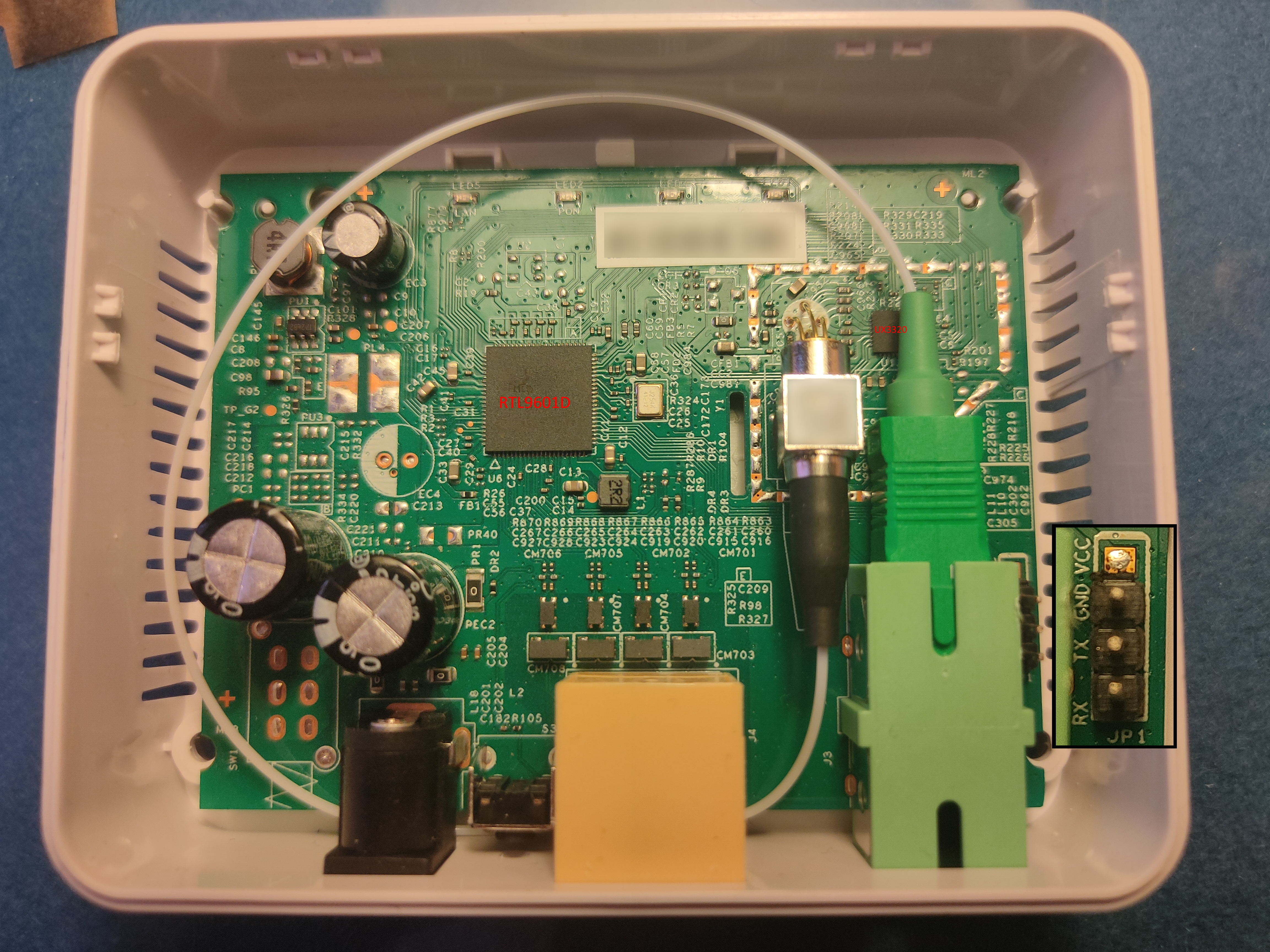
List of software versions
- CTN-1.0.2b51 (Cetin)
- CTN-1.1.4b6 (Cetin)
Useful files and binaries
Useful files
/var/config/lastgood.xml- Contains the user portion of the configuration/tmp/omcilog- OMCI messages logs (must be enabeled, see below)
Useful binaries
flash- Used to manipulate the config files in a somewhat safe mannerxmlconfig- Used for low-level manipulation of the XML config files. Called byflashnv- Used to manipulate nvram storage, including persistent config entries vianv setenv/nv getenvomcicli- Used to interact with the running OMCI daemonomci_app- The OMCI daemondiag- Used to run low-level diagnostics commands on the stick
GPON ONU status
Getting the operational status of the ONU
diag gpon get onu-stateQuerying a particular OMCI ME
# omcicli mib get MIB_IDXThe list of the MEs is in GPON MIB, and the most useful ones to check the provisioning received from the OLT are in Most useful MEs to check the provisioning.
To dump all the MEs at once[1]:
for ME in 2 5 6 7 11 24 45 47 49 50 52 78 79 83 84 89 130 131 133 134 136 137 148 157 158 171 240 244 245 248 249 250 253 255 256 257 262 263 264 266 267 268 272 273 274 277 278 280 281 284 287 296 298 307 308 309 310 311 312 321 322 329 330 334 340 341 65282 65294 65408 65527 65528 65529 65530 65531; do echo "MIB: $ME"; omcicli mib get $ME; doneTo dump the most useful MEs at once:
for ME in 6 7 11 84 131 171 256 257 262 263 264 277 309 329; do echo "MIB: $ME"; omcicli mib get $ME; doneGetting the GEM ports and the flows
# diag gpon show us-flow
============================================================
    GPON ONU MAC U/S Flow Status
Flow ID | GEM Port | Type | TCont
      0 |      263 |  ETH |     0
      1 |      264 |  ETH |     1
     64 |        2 | OMCI |    16
============================================================
# diag gpon show ds-flow
Getting the VLANs bridged by the stick
The L2 table shows the learned MAC addresses with their VLAN (Vid): if the internet traffic arrives untagged on the router, this is a way to find which VLAN is used on the PON side[2].
# diag l2-table get entry address validOn the RTL9601D (e.g. ODI DFP-34X-2C2) the valid parameter is not available, the table has to be read entry by entry:
i=0
while [ $i -lt 2047 ]; do
    diag l2-table get entry address $i | grep -q "LUT" && diag l2-table get entry address $i
    i=$((i+1))
done
Getting the port status and the bandwidth limits
# diag port get status port all
Port Status Speed    Duplex TX_FC RX_FC
---- ------ -----    ------ ----- -----
0    Up     1000M    Full   Dis   Dis
2    Up     1000M    Full   Dis   Dis
# diag bandwidth get egress port all
# diag bandwidth get ingress port all
GPON/OMCI settings
Getting/Setting ONU GPON Serial Number
# flash get GPON_SN
GPON_SN=TMBB00000000
# flash set GPON_SN TMBB0A1B2C3D
Getting/Setting ONU GPON PLOAM password
Note
The PLOAM password can be saved in either ASCII or HEX format, without any 0x or separators
# flash get GPON_PLOAM_PASSWD
GPON_PLOAM_PASSWD=AAAAAAAAAA
# flash set GPON_PLOAM_PASSWD AAAAAAAAAA
# flash set GPON_PLOAM_PASSWD 41414141414141414141
Getting/Setting OMCI software version (ME 7)
# nv setenv sw_custom_version0 YOURFIRSTSWVER
# nv setenv sw_custom_version1 YOURSECONDSWVER
Getting/Setting OMCI hardware version (ME 256)
# flash get HW_HWVER
HW_HWVER=V2.0
# flash set HW_HWVER MYHWVERSION
Getting/Setting OMCI vendor ID (ME 256)
# flash get PON_VENDOR_ID
PON_VENDOR_ID=ZTEG
# flash set PON_VENDOR_ID HWTC
Getting/Setting OMCI equipment ID (ME 257)
# flash get GPON_ONU_MODEL
GPON_ONU_MODEL=DFP-34X-2C2
# flash set GPON_ONU_MODEL DFP-34X-XXX
Getting/Setting OMCI OLT Mode and Fake OMCI
Configure how ONT Stick handle OMCI from OLT:
# flash get OMCI_OLT_MODE
OMCI_OLT_MODE=1
# flash set OMCI_OLT_MODE 2| Value | Note | OMCI Information |
|---|---|---|
| 0 | Default Mode | Stock setting, some values cannot be changed |
| 1 | Huawei OLT Mode | Huawei MA5671a |
| 2 | ZTE OLT Mode | ZTE |
| 3 | Customized Mode | Custom Software/Hardware Version, OMCC, etc... |
Some vendors/wholesale providers/ISPs have explicit LAN Port Number provisioning or proprietary OMCI that the stick cannot understand, this will make the stick reply OK to whatever the OLT sends it via OMCI.
0 = Disable, 1 = Enable, Default is 0
# flash get OMCI_FAKE_OK
OMCI_FAKE_OK=0
# flash set OMCI_FAKE_OK 1
Advanced settings
Setting management IP
# flash get LAN_IP_ADDR
LAN_IP_ADDR=192.168.2.1
# flash set LAN_IP_ADDR 192.168.1.1
Getting/Setting the L2 Bridge MTU
Note
Settings given via diag are not permanent after reboot
Getting/Setting the MTU of the L2 bridge
# diag switch get max-pkt-len port all
Port Speed
----------
0 1538
2 2031
# diag switch set max-pkt-len port all length 2000
Checking the currently active image
# nv getenv sw_active
sw_active=1
# nv getenv sw_version0
sw_version0=V1_7_8_210412
# nv getenv sw_version1
sw_version1=V1_7_8_210412
Booting to a different image
The firmware upgrade always writes the inactive image, so it is possible to go back to the previous firmware[3]:
# nv setenv sw_commit 0|1
# nv setenv sw_active 0|1
# reboot
Modifying the firmware
Warning
A wrong rootfs makes the image unbootable: always flash the inactive image, so that the stick can still boot the other one, and keep a backup of all the partitions.
Transferring files from/to the stick
Run md5sum on the source and on the destination to make sure that the file has not been corrupted.
Via SSH, from the stick to the PC and vice versa:
ssh admin@192.168.1.1 "cat /dev/mtd5" > mtd5.bin
cat rootfs.new | ssh admin@192.168.1.1 "cat > /tmp/rootfs.new"
Via TFTP (a TFTP server must be running on the PC):
# tftp <PC IP>
tftp> get rootfs.new
tftp> put <filename> <directory>
tftp> q
Via netcat (nc on the stick does not exit at the end of the transfer: stop it with CTRL+C)[4]:
# on the stick
nc -l -p 12345 > /tmp/rootfs.new
# on the PC
nc 192.168.1.1 12345 < rootfs.new
Info
On Windows run the commands from cmd (not PowerShell) and replace cat with type.
Extracting and repacking the rootfs
The rootfs is a SquashFS (LZMA) image: on the stick it is in r0 (/dev/mtd5) for the image 0 and in r1 (/dev/mtd7) for the image 1, while the kernel is in k0 (/dev/mtd4) and k1 (/dev/mtd6).
Warning
Run both commands as root, otherwise the rootfs image might be damaged.
# unsquashfs mtd5.bin
# mksquashfs squashfs-root rootfs.new -b 131072 -comp lzma -no-recovery
The RTL960x emulator runs the extracted firmware in QEMU (qemu-user-static) to modify and test it before flashing it: any file in its custom folder is copied over squashfs-root when leaving the chroot, and the custom startup scripts go in /etc/init.d/rc35.
Flashing a new rootfs
Check which image is running (nv getenv sw_active): flash mtd6/mtd7 if the image 0 is running, mtd4/mtd5 if the image 1 is running. The following commands flash a new rootfs to the image 1 and boot it:
# flash_eraseall /dev/mtd7
# cat /tmp/rootfs.new > /dev/mtd7
# nv setenv sw_version1 NEW_SOFTWARE_VERSION
# nv setenv sw_commit 1
# reboot
If cat fails with cat: write error: Invalid Argument, write the image to the block device instead:
# flash_eraseall /dev/mtd7
# cat /tmp/rootfs.new > /dev/mtdblock7
Repacking a firmware upgrade file
The firmware upgrade files of the ODM firmwares (e.g. V-SOL, T&W, ODI) are a tar containing the kernel (uImage), the rootfs, the fwu.sh upgrade script, the fwu_ver version file and the md5.txt checksums: after replacing the rootfs, update the checksums and repack it, then upload it from the Web GUI firmware upgrade page[4:1]:
tar -xf firmware.tar
mv rootfs.new rootfs
md5sum fwu.sh rootfs uImage fwu_ver > md5.txt
tar -cvf ../firmware-mod.tar *
The Firmware_Mod folder of the RTL960x repository contains the community patches for the ODI DFP-34X-2C2, V-SOL V2801F and T&W TWCGPON657 (Bootstrap Web GUI, VLAN, speed and software version fixes).
Unlocking full shell
Although the option to enter linux shell is displayed in help command, it silently fails until per-firmware password is provided.
This string is stored plaintext and hardcoded into /bin/cli and can be easily dumped.
# Example commands for firmware CTN-1.1.4b6
version --debug 23KcykMddk
factorymode --password y0S4QbPhAD96GYp
shell
Extracting and repacking the rootfs
Warning
Make sure you run both commands as root, otherwise you might get a damaged rootfs image
# unsquashfs mtd5.bin
# mksquashfs squashfs-root rootfs -b 131072 -comp lzma -no-recovery
Firmware patch
Simple change with a hex editor can be done to enable full shell, inside /lib/libmib.so, change /bin/cli to /bin/ash
Then add /bin/ash to /etc/shells to enable normal shell.
In case device contains locked default configuration /etc/config_default.xml can be modified to undo any unwanted restrictions.
Flashing new firmware
U-Boot has working network and commands provided to load kernel and rootfs over TFTP.
It's recommended you preserve old firmware with md.b, SPI base address and size can be found in env.
TFTP requested filenames:
- uImage - U-Boot OS Kernel image
- rootfs - SquashFS root
# Update image0
run upk;run upr;
# Update image1
run upk1;run upr1
Or from linux system
# tftp <IP>
tftp> mode octet
tftp> get rootfs.img /tmp/rootfs.new
tftp> quit
# flash_eraseall /dev/mtd7
# cat /tmp/rootfs.new > /dev/mtd7
Miscellaneous Links
OMCI MIB, Anime4000/RTL960x https://github.com/Anime4000/RTL960x/blob/main/Docs/OMCI_CLI.md ↩︎
Diag, Anime4000/RTL960x https://github.com/Anime4000/RTL960x/blob/main/Docs/DIAG.md ↩︎
Firmware Partition, Anime4000/RTL960x https://github.com/Anime4000/RTL960x/blob/main/Docs/fw_part.md ↩︎
Modify firmware, Anime4000/RTL960x https://github.com/Anime4000/RTL960x/blob/main/Docs/Modify_Firmware.md ↩︎ ↩︎